This post covers one specific piece of the Sai Dance Academy build in full detail: the Stripe payment integration. If you've ever tried to wire Stripe into a Salesforce Experience Cloud site for anonymous guest users, you'll know it's one of those integrations where the happy-path tutorial runs out quickly and the real work begins.
I'm documenting this because the issues I hit — guest Apex REST access across multiple sites, webhook payload parsing, sharing context, credential header gotchas — are exactly the things that cost hours and don't appear in the official docs. Consider this the guide I wish I'd had.
Don't have a Stripe account yet? You'll need one to follow along. Test mode is free — no payment details required to start building.
Create a free Stripe account →The big picture
What We Built — In One Paragraph
A visitor picks a class on the public site and submits an enrollment form. Salesforce creates an Enrollment__c record with status Pending Payment, then calls Stripe to create a Checkout Session and redirects the visitor to Stripe's hosted payment page. The visitor pays. Stripe fires a webhook to a public Salesforce REST endpoint. The handler finds the enrollment by the record ID stored in Stripe's session metadata, flips the status to Confirmed, writes a Payment__c audit record, and a record-triggered Flow sends a confirmation email. The same pattern powers paid event RSVPs. Everything runs for anonymous guest users — no login required.
The architecture
Visitor on /sda/enroll
      │ submits form (LWC)
      ▼
EnrollmentController.createEnrollment
      │ DML only — Contact + Enrollment__c (Pending Payment)
      │ returns enrollmentId
      ▼
StripeCheckoutController.createCheckoutSession
      │ callout only — POST to Stripe, save Session Id
      │ returns Stripe Checkout URL → Enrollment → Awaiting Payment
      ▼
Stripe hosted Checkout page
      │ visitor pays with card
      ▼  (server-to-server)
Stripe webhook → POST payment_intent.succeeded
      ▼
StripeWebhookHandler (@RestResource, public)
      │ find Enrollment by metadata id
      │ set Confirmed, write Payment__c
      ▼
Record-triggered Flow
      │ emails student + admin
Two Apex classes, one REST endpoint, one Flow, and the credential plumbing. The responsibilities are split deliberately — and that split is forced by a hard Salesforce platform rule I'll come to in section 3.
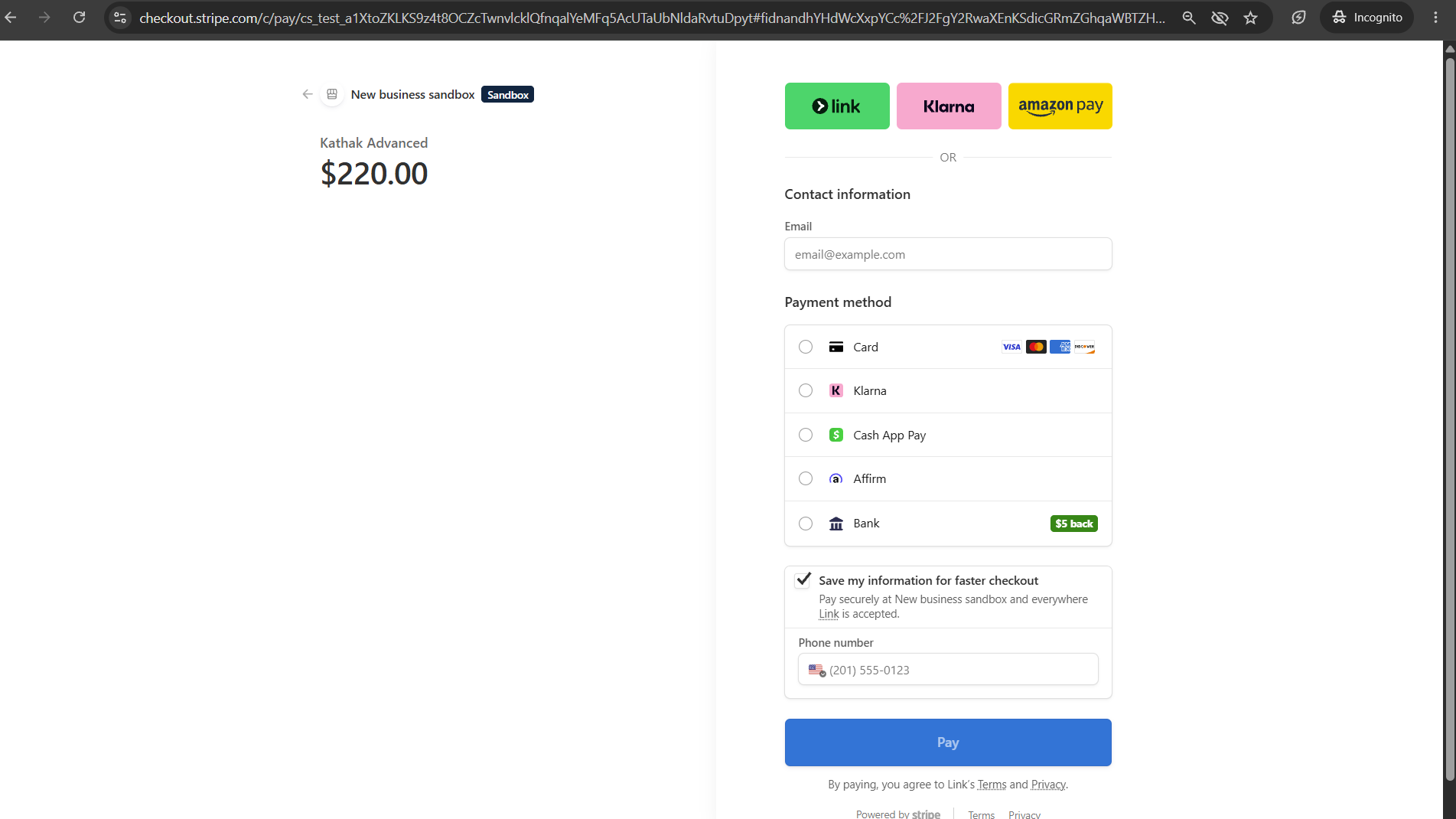
Stripe Checkout in test mode — class name and fee passed from Salesforce via the Checkout Session
The secure foundation
Credential Setup — No Secret Keys in Code
Before writing a line of Apex, the credentials need to be in place. Stripe's secret key never touches the codebase — it lives in Salesforce's credential framework and is referenced by name.
What you need to set up
- Remote Site Setting — add
https://api.stripe.comso Apex is permitted to call out to Stripe's servers - External Credential (
Stripe_API_Credential) — holds the secret key as a Custom Header; the principal's parameter stores the full bearer string - Named Credential (
Stripe_API) — references the External Credential; Apex usescallout:Stripe_APIto make authenticated calls - Permission Set (
Stripe_API_Access) — grants principal access to the External Credential; must be assigned to all running users including the guest user - CSP Trusted Sites — add
js.stripe.comandapi.stripe.comso the Experience Cloud site can load Stripe's JavaScript assets
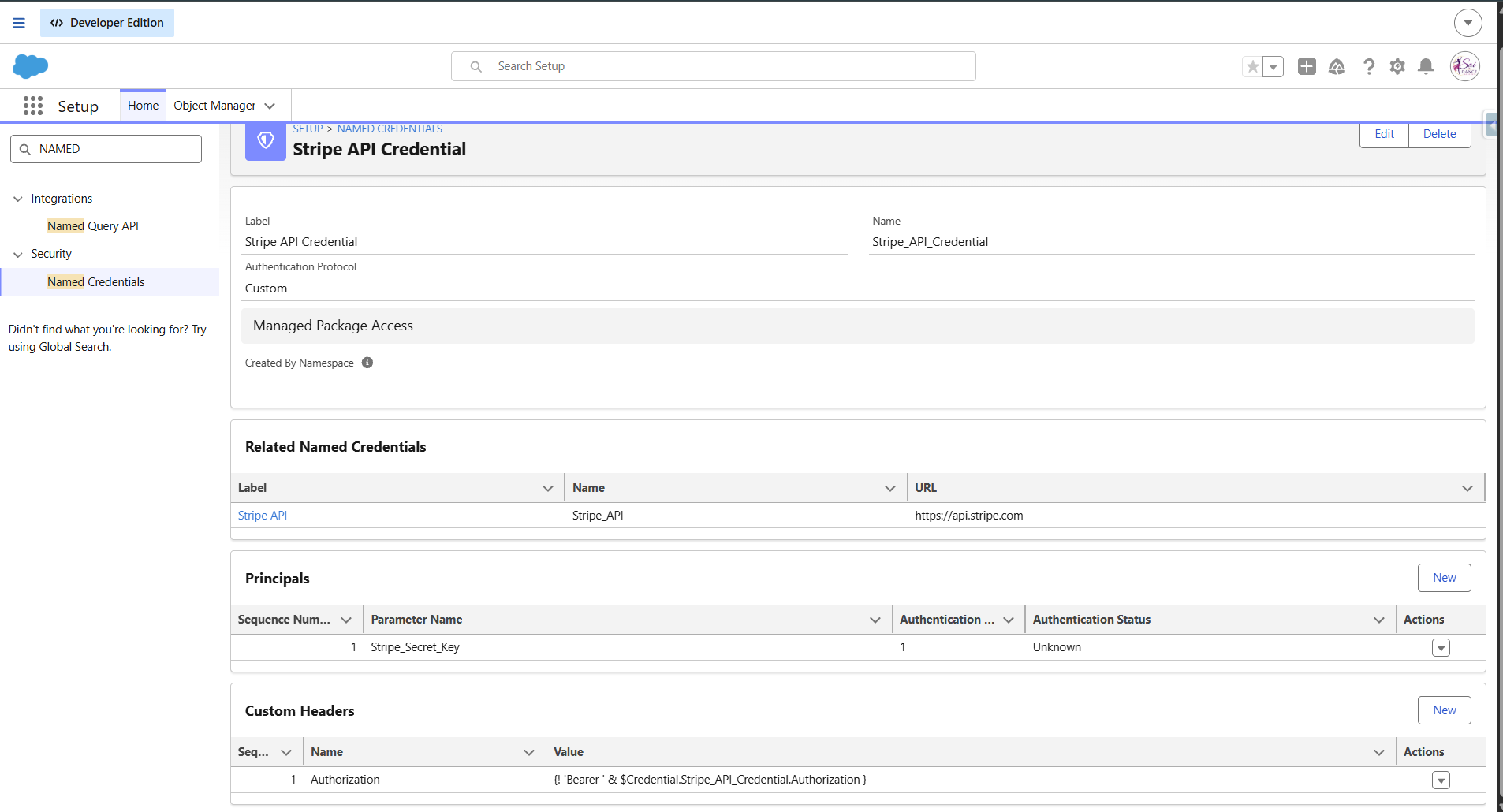
External Credential — Stripe secret key stored securely, never in code
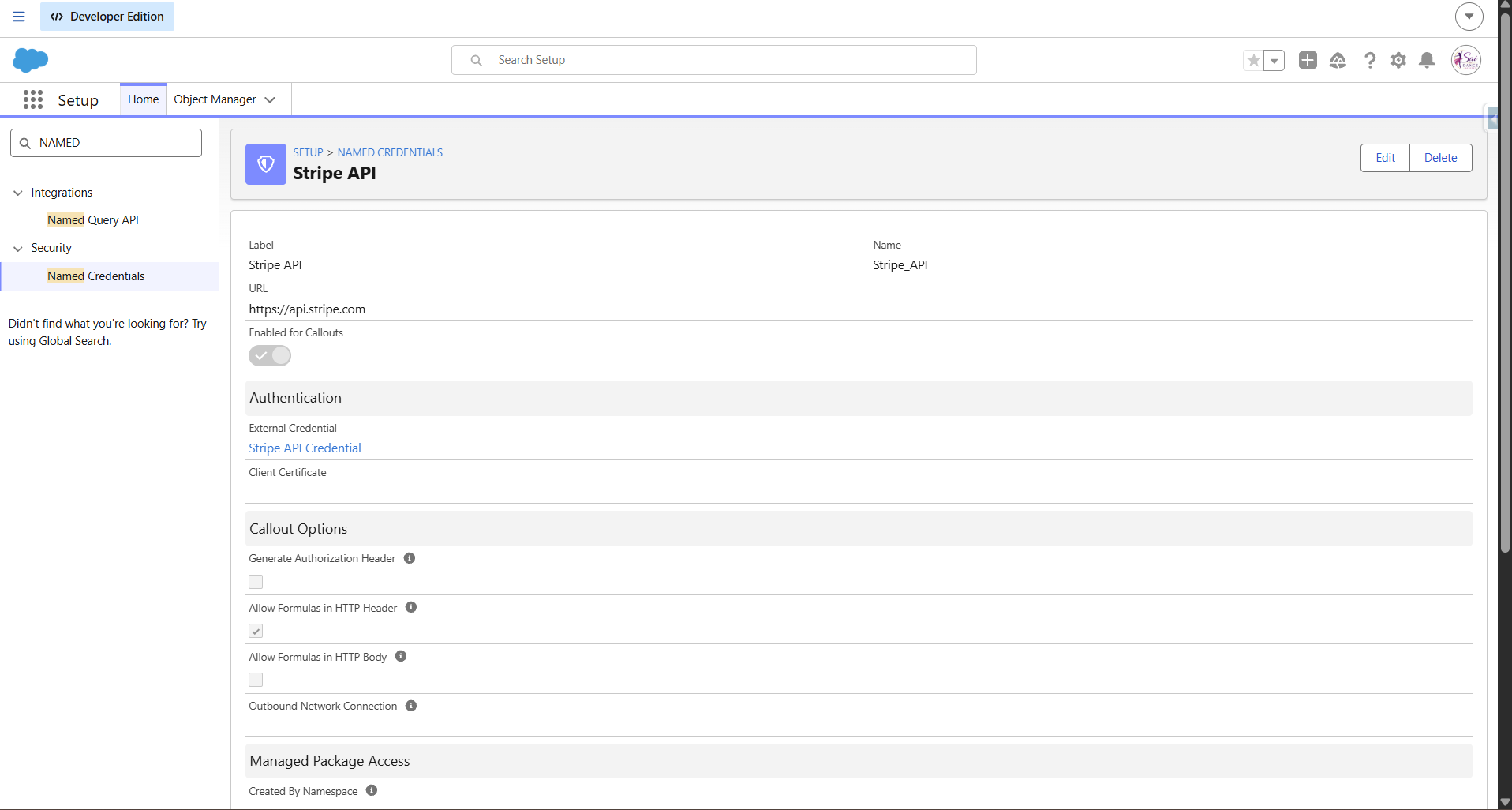
Named Credential — Apex references this as callout:Stripe_API
⚠️ The single trickiest credential detail — a multi-hour gotcha
In the External Credential's Custom Header, the Authorization header must reference the inner auth-parameter name, not the principal's display label:
Authorization = {!$Credential.Stripe_API_Credential.Authorization}
The inner parameter is literally named Authorization, and its value holds the raw bearer string — so no Bearer prefix is needed (the value already is the full token). "Allow Formulas in HTTP Header" must also be checked, or the merge field is treated as literal text. Referencing the principal label instead of the inner parameter name silently fails authentication. This is the kind of thing no quickstart mentions.
A platform rule that shapes the architecture
The Two-Call Pattern — Why DML and Callout Must Be Split
The enrollment flow makes two separate Apex calls from the LWC, not one. This isn't a design preference — it's forced by a hard Salesforce platform rule:
⚡ Platform rule
You cannot make an HTTP callout after a DML operation in the same transaction. If a single method creates the Enrollment (DML) and then calls Stripe (callout), Salesforce throws "You have uncommitted work pending."
The solution is to split the work across two transactions:
- Call 1 — DML only:
EnrollmentController.createEnrollment— deduplicates the Contact by email, creates the Contact andEnrollment__c(status Pending Payment), returns the newenrollmentId. Commits cleanly with no callout. - Call 2 — Callout first, then DML:
StripeCheckoutController.createCheckoutSession— calls Stripe to create the Checkout Session (callout first), then updates the Enrollment with the Session ID and status Awaiting Payment (DML after callout — this is allowed). Returns the Stripe URL to the LWC. - LWC chains them: call one, get the id, call two, redirect to the returned Stripe URL.
💡 The rule in plain English
Callout before DML in a single transaction: allowed. DML before callout: not allowed. Callout then DML (in the same transaction): allowed. The pattern that works is either "callout first, then DML" or "split into two transactions." Here we use both — transaction one is DML-only, transaction two is callout-then-DML.
The callout design
The Checkout Controller — What Goes to Stripe
The checkout controller (StripeCheckoutController) is without sharing — it runs in the guest context and must operate regardless of the guest's record sharing rules. Three design decisions here are worth understanding:
Form-encoded, not JSON
Stripe's Checkout Session endpoint expects form-encoded data, not JSON. The request body is built as application/x-www-form-urlencoded with keys like line_items[0][price_data][unit_amount]. This trips up developers expecting a JSON API — Stripe's payment endpoints consistently use form encoding.
Amount in the smallest currency unit
⚠️ Common bug
Stripe amounts are in the smallest currency unit — multiply by 100. A $55.00 class fee must be sent as 5500. Forgetting this results in charging 100× the correct amount. This is a frequent source of "why did it charge $5500?" bugs in testing.
The metadata handshake — the most important part
The enrollment record ID is written into Stripe's session metadata in two places:
// Both of these are needed
metadata[enrollment_id] = enrollmentId
payment_intent_data[metadata][enrollment_id] = enrollmentId
Why both? The checkout.session.completed event carries metadata. But this integration uses payment_intent.succeeded — and that event carries payment_intent_data[metadata]. Writing to both covers either event type. The webhook uses the enrollment_id from metadata to find the exact record to confirm. Miss this and the webhook arrives but has nothing to update.
The hard part
The Webhook Handler — Architecture and Design
When Stripe finishes processing a payment, it sends a POST request to a public Salesforce REST endpoint. This is the piece that took the most work to get right — across four separate problems I'll detail in the next section. Here's how the handler is designed:
@RestResource(urlMapping='/stripe/webhook/*')
global without sharing class StripeWebhookHandler {
    @HttpPost
    global static void handleWebhook() {
        // Parse → find record → update → return 200
    }
}- Must be
global— notpublic. Sites REST exposure requires global visibility - The wildcard
/*in urlMapping is required — without it Salesforce does exact-match only and rejects Stripe's calls - The public URL is at the site root, not under the site path:
https://<site-domain>/services/apexrest/stripe/webhook— there is no/sda/segment in the URL - Always returns HTTP 200 — even on internal errors. If Stripe receives anything other than 2xx, it enters a multi-day retry storm. Internal problems are logged separately, never surfaced to Stripe as errors
- Payload is parsed with
JSON.deserializeUntypedinto aMap<String, Object>— handles Stripe's evolving, deeply-nested payload without brittle typed wrappers - Branches on metadata key —
enrollment_idfor class enrollments,rsvp_idfor event RSVPs — handles both record types from one endpoint
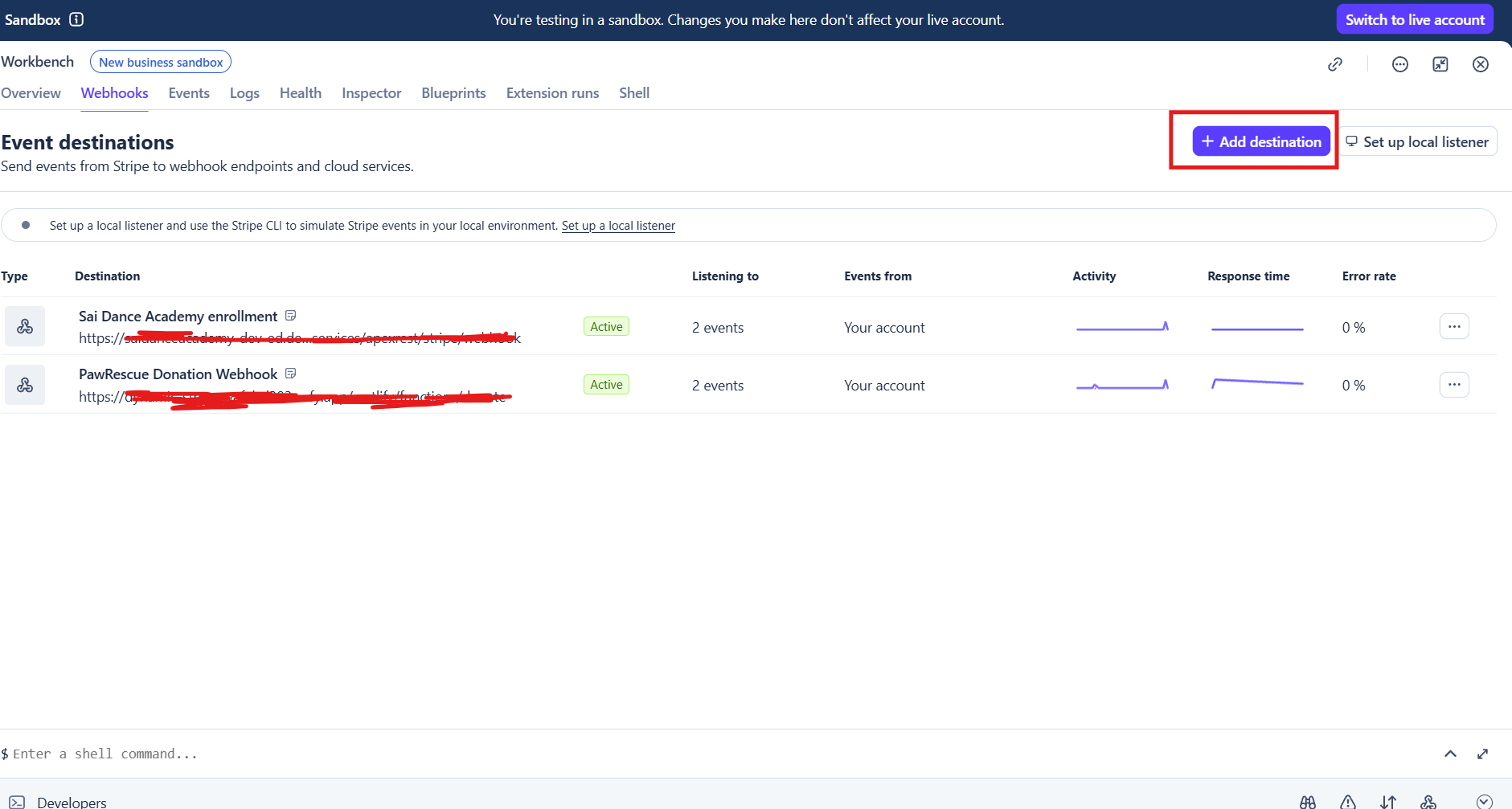
Stripe dashboard — webhook endpoint pointing to the Salesforce REST endpoint URL
Where the real learning happened
The Webhook Saga — Four Problems, Four Fixes
Getting the webhook working end-to-end took four separate debugging sessions. Each problem was independent — fixing one revealed the next. This section is the most valuable part of this article because these are the non-obvious issues that don't appear in tutorials.
esw_* site auto-created by the Agentforce/Embedded Service deployment. The Apex class was enabled on the main site's guest profile, but the REST call was resolving against one of the other sites' guest context./services/apexrest/ REST endpoints). The webhook uses the latter. In a multi-site org, both must be configured on every site..replace('"object":', '"object_x":') trick to work around Apex reserved words (object, currency). Stripe's newer API version sends a much richer, deeply-nested payload. The blunt string replacement was corrupting string values (like "object": "event"), breaking deserialization entirely.JSON.deserializeUntyped into a Map<String, Object>. Reserved words become harmless map keys. Extra fields in the payload are simply ignored. The rewrite also made the handler surface the real error text in the HTTP response — which meant the next problem became immediately visible in Stripe's dashboard.with sharing. It runs as the Site Guest User — a different user from the one who created the enrollment. In Salesforce's sharing model, a different user in a separate transaction can't see records created by another user unless sharing is explicitly opened. The query returned zero rows because the guest user running the webhook had no visibility of the guest-created enrollment.without sharing. It now runs in system context and can find and update any record regardless of sharing rules.without sharing is the correct and appropriate choice — this isn't bypassing security for a person, it's a backend integration that needs to operate on records regardless of who created them.CANNOT_EXECUTE_FLOW_TRIGGER blocking the confirmation email, then INVALID_OR_NULL_FOR_RESTRICTED_PICKLIST on Currency_Code__c.Currency_Code__c was a restricted picklist that didn't include the currency value being written by the webhook.How to validate it works
Testing the Pipeline
Once the integration is wired up, here's how to test and debug efficiently:
- Stripe test card:
4242 4242 4242 4242, any future expiry, any CVC — simulates a successful payment every time - Stripe "Resend": in the Stripe dashboard, find a delivered webhook event and click Resend — this re-fires the webhook to your endpoint without making a new payment. Invaluable for iterating on the handler without running the full enrollment flow each time
- Guest user debug logs: the webhook runs as the Site Guest User, not your admin user. To capture its debug log, add the Site Guest User as a traced entity in Setup → Debug Logs. Remember the trace flag expires — a webhook firing after expiry leaves no log
- Return real error text: make the handler include the actual exception message in its HTTP response body. Stripe's dashboard shows this text — often faster than hunting the debug log for the same error
- Verify the records: after a test payment, always check: Enrollment status = Confirmed, a
Payment__crow with correct amount and currency, and the confirmation email arrived
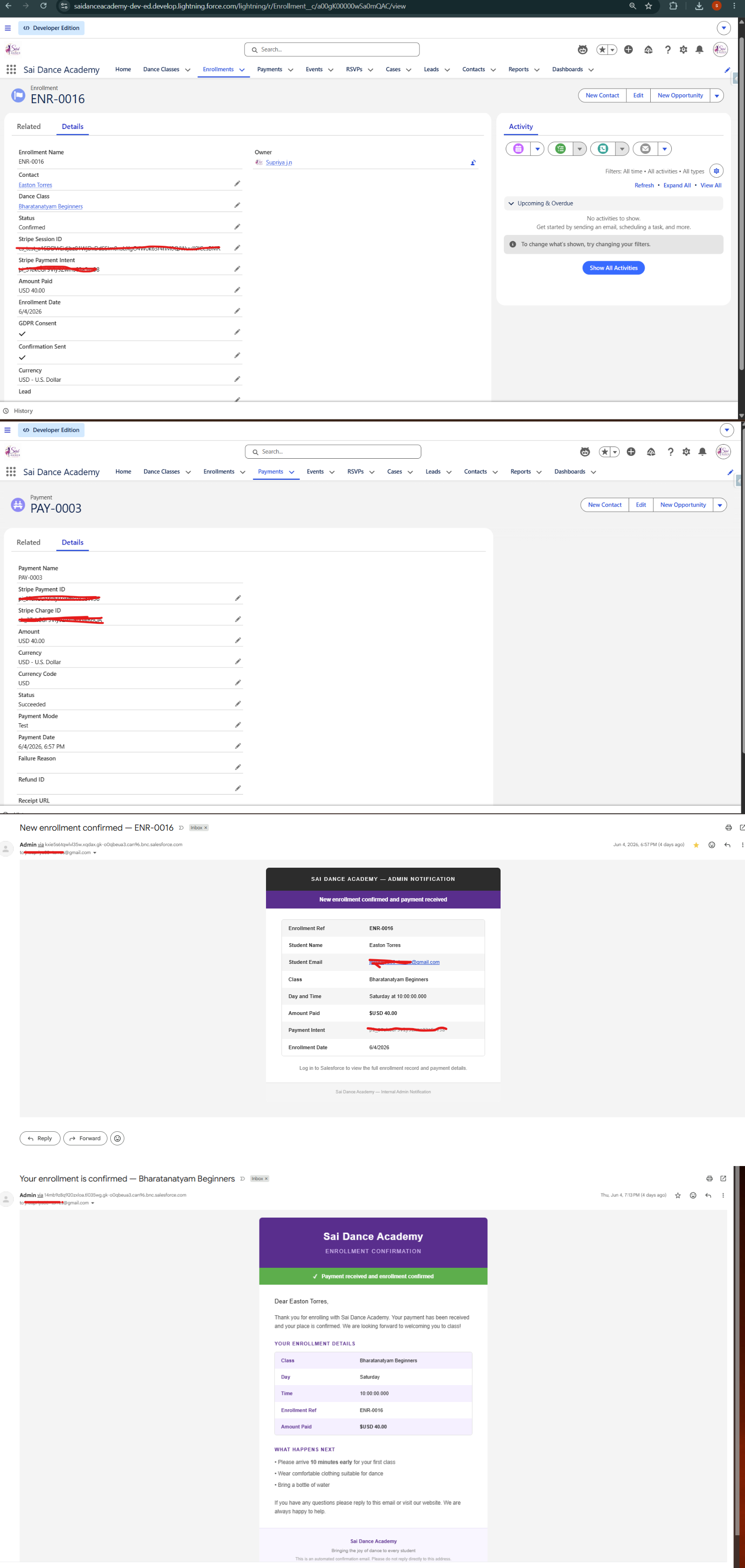
The end state — Enrollment confirmed, Payment__c audit record created, email sent
Lessons Checklist
Everything from this build distilled into a scan-able reference:
- Store the secret key in an External/Named Credential — never in code
- Reference the inner auth-parameter name (
Authorization), not the principal label, in the Custom Header - Enable "Allow Formulas in HTTP Header" — without it the merge field is literal text
- Split DML and callout across two transactions — one LWC call for DML, one for callout
- Stripe Checkout uses form-encoded bodies — not JSON
- Multiply currency amounts by 100 — Stripe works in the smallest unit
- Write the record ID into both
metadataandpayment_intent_data[metadata] - Webhook class must be
globalwith a/*wildcard urlMapping - Webhook URL is at
/services/apexrest/— no site path prefix - Always return HTTP 200 to Stripe — log errors internally, never surface them as non-200
- Enable Apex class access on every site's guest profile in a multi-site org
- Use
JSON.deserializeUntyped— not typed wrappers — for webhook payloads - Webhook handler must be
without sharingto find guest-created records - Restricted picklists must include every value the code writes
- Use Stripe's "Resend" and surface real error text in the response to debug fast
See it live
The full payment pipeline is live. Use Stripe test card 4242 4242 4242 4242, any future date, any CVC. Use a real email to receive the confirmation.
Salesforce Experience Cloud (LWR) · Apex · Stripe Checkout · Named Credentials · Guest User Context · Record-Triggered Flow