← This is Part 2 of a 2-part series. Part 1 covers the architecture, data model, and user journeys.
Read Part 1 first →
Every project has a build record — the real story of what went wrong and what it took to fix it. This is that record for the Sai Dance Academy platform. Fourteen issues, each documented with the symptom, the root cause, the fix, and what it taught me.
I'm sharing this because this is the work that actually demonstrates platform depth. Anyone can follow a tutorial to completion. The difference shows when the tutorial runs out and you're staring at a cryptic error at 11pm with no Stack Overflow answer that matches exactly.
The Stripe integration is the technical centrepiece of this project. Understanding how it works — and why it was built this way — is the context for several of the issues below.
How the payment flow works
When a visitor enrolls in a class or registers for a paid event, the LWC makes two sequential Apex calls:
- Call 1 — DML first: creates the Enrollment or RSVP record with status Pending Payment, stores the record ID
- Call 2 — Callout: creates a Stripe Checkout session, passing the record ID in the session metadata, returns the Stripe URL
- LWC redirects the visitor to Stripe Checkout
- On payment: Stripe fires a webhook to a public
@RestResource endpoint
- Webhook reads metadata to find the record ID, updates status to Confirmed or Payment Failed, creates Payment audit record, triggers confirmation email
💡 Why DML before callout
Salesforce prohibits HTTP callouts after DML in the same transaction — "You have uncommitted work pending." The solution is to sequence DML first, then callout — or split into two transactions. Here it's two sequential LWC→Apex calls, chained by the LWC. This is a fundamental platform rule that shapes the architecture.
The webhook endpoint
The webhook is a public Apex REST class — accessible by Stripe's servers without a Salesforce session. It runs without sharing because it's a trusted server-to-server caller, not an end user, and needs to find and update guest-created records regardless of sharing rules.
The payload is parsed with JSON.deserializeUntyped into a Map<String, Object>. It branches on which metadata key is present — enrollment_id or rsvp_id — and handles both record types. Unrecognised event types and missing records return HTTP 200 silently — the webhook never crashes.
The Agentforce agent is deployed to the Experience Cloud site via Omni-Channel and Embedded Messaging. It's grounded in live org data through @InvocableMethod actions — the same Apex methods that power the class catalogue — so when it answers "what classes do you have?", it's reading real records, not a static prompt.
The responsible handoff decision
The agent's scope was deliberately bounded. It recommends, informs, and creates records only where appropriate — leads for enquiries, cases for support issues. It does not attempt to process payments or create enrollments. When someone asks to enroll, it provides the enrollment link.
🤖 Why this matters
An agent that attempts payment transactions creates a broken experience when the payment fails. An agent that hands off to the proper paid path creates a trustworthy one. The agent is most useful where it can act fully — discovery, recommendation, enquiry capture — and most responsible where it hands off instead of overreaching.
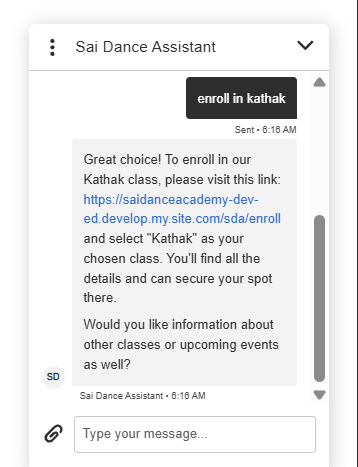
Agentforce — live class data, grounded recommendations
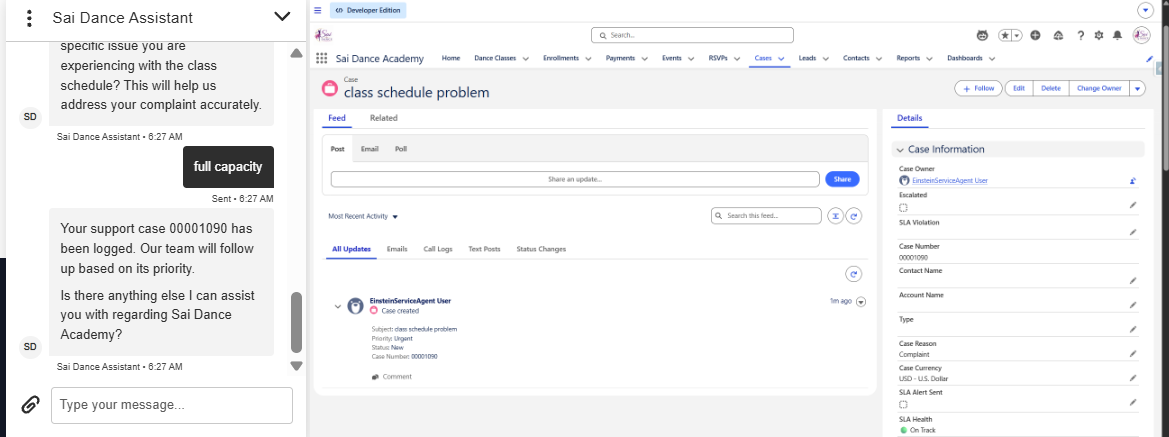
Case created by the agent — verifiable in the org
These are environment-specific, non-obvious problems that don't appear in tutorials. Each one required diagnosis, research, and a deliberate fix. This is the section I'd ask a candidate to walk me through in an interview — it's where the platform understanding shows.
Symptom
After payment, Stripe called the webhook and got a "no access to the Apex class" error. Enrollments never got confirmed. Stalled for days.
Root cause
The Apex class was enabled on the main site's guest profile, but the org had multiple sites — a default help center and an esw_* site auto-created by the Agentforce/Embedded Service deployment. The guest REST call resolved against a different site's guest context that didn't have access.
Fix
Grant the Apex class on the guest profile of all sites in the org — each site's Public Access Settings → Apex Class Access.
Lesson
In a multi-site org, guest Apex REST access must be granted on every site's guest profile. The Sites guest profile (governing /services/apexrest/) is distinct from the Experience Cloud guest profile (governing pages).
Symptom
Once reachable, the webhook returned HTTP 200 but with "Internal error logged," and nothing updated.
Root cause
The original handler used typed wrapper classes plus a string .replace() trick to dodge Apex reserved words (object, currency). Stripe's newer API version sends a richer, deeply-nested payload — the blunt string replacement corrupted it and broke deserialization entirely.
Fix
Rewrote the handler to parse with JSON.deserializeUntyped into a Map<String, Object>. Reserved words become harmless map keys and extra fields are simply ignored.
Lesson
Parse evolving third-party webhook payloads with untyped JSON, not rigid typed wrappers. The rewrite also surfaced the real error text in the HTTP response, which made the next problem visible.
Symptom
The rewritten handler returned "OK," but the enrollment still didn't change status.
Root cause
The handler was with sharing, so it ran under the guest user's record visibility and couldn't see the guest-created enrollment in a separate transaction — the query returned zero rows.
Fix
Changed the handler to without sharing so it runs in system context and can find and update the record regardless of guest sharing rules.
Lesson
A webhook is a trusted server-to-server caller, not an end user. without sharing is appropriate — this isn't bypassing security for a person, it's a backend integration operating on records it created.
Symptom
Stripe callouts failed auth with "no API key provided," then "Field Stripe_API_Credential.Stripe_Secret_Key does not exist."
Root cause
In the modern Named/External Credential model, the principal's parameter name and the inner authentication parameter name are two different things. The Custom Header merge field needs the inner parameter name — which was Authorization — not the principal label. Also, "Allow Formulas in HTTP Header" must be checked or the merge field is treated as literal text.
Fix
Set the custom header to {!$Credential.Stripe_API_Credential.Authorization} with "Allow Formulas in HTTP Header" enabled.
Lesson
External Credential header references point at the inner auth-parameter name, and formula evaluation must be explicitly enabled. A multi-hour gotcha with no clear error pointing at the real cause.
Symptom
A single method that created an enrollment and then called Stripe threw "You have uncommitted work pending."
Root cause
Salesforce prohibits an HTTP callout after a DML operation in the same transaction. A fundamental platform rule.
Fix
Split into two LWC→Apex calls: the first does the DML (creates enrollment, returns ID); the second does the callout (creates Stripe session using that ID). The LWC chains them sequentially.
Lesson
Sequence callouts before DML in a single transaction, or split the transaction. This rule shapes the entire enrollment flow architecture.
Symptom
The org and fees were USD, but the website displayed £ and Stripe charged GBP.
Root cause
The project began with a UK framing while the org was USD — the two drifted. The 'gbp' value came from the LWC, and the £ symbol was produced by locale-based JS number formatting, not a literal character — which is why searching the markup found nothing.
Fix
Standardised on USD: changed 'gbp' → 'usd' in the LWCs, changed display formatting to $, added USD to the restricted Currency_Code__c picklist.
Lesson
Currency must agree across org, data, display, and payment gateway. Currency symbols can be produced by formatting code, not just literal characters — search for the formatter, not the symbol.
Symptom
Images placed via CMS showed in Experience Builder preview but were blank on the published site in incognito.
Root cause
CMS-managed content requires the workspace to be shared to the site's channel/audience and each item published. Preview runs authenticated — guests don't get the content without that setup.
Fix
Switched to Static Resources (Cache Control = Public), referenced as /sfsites/c/resource/NAME. Public by default, no channel/audience configuration required.
Lesson
For images in guest-facing custom components, prefer Static Resources over CMS. Diagnostic pattern: "shows in preview, blank in incognito" → almost always a guest permissions issue.
Symptom
Paid event payments succeeded at Stripe, but the RSVP never became Confirmed.
Root cause
The webhook only handled class enrollments — it read metadata.enrollment_id and updated Enrollment__c. Event payments carry rsvp_id, so the handler found no enrollment ID and silently returned.
Fix
Extended the webhook to branch on which ID is present (enrollment_id vs rsvp_id) and confirm the matching record type in both success and failure paths.
Lesson
When the same payment pipeline serves two record types, the webhook must handle both. Silent returns are the hardest bugs to find — always log what the handler received and what it matched.
Symptom
Creating a payment record failed with "bad value for restricted picklist field" on Currency Code.
Root cause
Currency_Code__c was a restricted picklist that didn't include the value the code was writing. Code and metadata drifted apart.
Fix
Added the correct value to the picklist.
Lesson
Restricted picklists must include every value your code writes. When currency changed from GBP to USD, the picklist change was missed. Code and metadata must be kept in sync.
Symptom
CANNOT_EXECUTE_FLOW_TRIGGER — "we can't send your email because your email address domain isn't verified."
Root cause
The Flow's email action used a sender whose domain wasn't verified in Salesforce.
Fix
Configured and used a verified Org-Wide Email Address as the sender in all automated Flow email actions.
Lesson
Automated emails need a verified sender. This root cause recurred across enrollment, RSVP, and case emails — solving it once for the Org-Wide Address fixed the pattern everywhere.
Symptom
Confirmation emails couldn't merge related Contact and Class fields from the Enrollment record.
Root cause
Lightning email templates can't do cross-object merges or work in Flow email alerts the way needed.
Fix
Used Classic email templates fed by formula fields on the Enrollment record that flatten related data — contact name, class name, dates — with picklist/date values wrapped in TEXT().
Lesson
For automated record-based emails with related-object data in Flow, Classic templates + formula fields is the reliable pattern. Not glamorous, but it works consistently.
Symptom
After changing getActiveClasses to return a wrapper type (to add capacity data), all class cards stopped rendering on both pages.
Root cause
Changing the return type of a working wired Apex method broke the contract the LWC depended on.
Fix
Reverted to the original return type. Added capacity as a separate Apex method consumed by a second @wire. If the capacity query has any issue, the cards still render.
Lesson
Don't change the return type of a working wired method to bolt on new data — add a separate method. Lower blast radius, graceful degradation if one wire fails.
Symptom
A full deploy failed — a test called createRsvp with 9 parameters but the method had 6, and a webhook class had a typo (requestgitBody).
Root cause
Local files had drifted from the org. The test was written against an old method signature, and an accidental edit introduced a typo in the class name.
Fix
Aligned the test to the current method signature, added missing required setup data, corrected the typo. Deployed targeted components to isolate the broken classes while fixing them.
Lesson
Keep local and org in sync. Deploy targeted components to isolate unrelated failures. Tests must track method signatures — drift is silent until deploy time.
Symptom
The class fee was present in the DOM but invisible on the page — until the text was highlighted.
Root cause
Text colour matched the background — a colour/contrast issue, not a data problem. The value was there and correct.
Fix
Set the fee text colour explicitly in the component CSS.
Lesson
"Content is there but not visible" is almost always a colour-matching-background issue. Highlighting the text to reveal it confirms this instantly — saves time chasing a data problem that doesn't exist.
Fourteen separate issues, but they cluster into five platform patterns. Understanding these patterns — not just the individual fixes — is what transfers to the next project.
Guest context is its own discipline
Object permissions, FLS, Apex class access, sharing context, and multi-site guest profiles all matter — and they're independent of each other. Issues 1, 3, and 7 all stem from the same root: preview runs authenticated, production runs as a guest. Always test in incognito.
Third-party integrations evolve
Parse defensively with untyped JSON, surface real errors in HTTP responses, and use the provider's resend/replay tools to debug without making a new payment every time. Issue 2 cost the most time — the fix took 20 minutes once the root cause was visible.
Platform rules shape architecture
Callout-after-DML, sharing context, and restricted picklists each forced specific design choices — not just fixes. Issues 3, 5, and 9 aren't bugs to patch around; they're platform rules to design with.
Email on the platform has sharp edges
Verified senders and Classic-template + formula-field patterns are the reliable path. Issues 10 and 11 both hit the same category — automated email — and the fixes follow the same reliable pattern.
Change working contracts carefully
Altering a wired method's return type or letting local/org drift apart causes outsized breakage relative to the size of the change. Issues 12 and 13 both come from this — small changes with large blast radius because a working contract was disrupted.
6
End-to-end user journeys working in production
14
Issues diagnosed, resolved, and documented
2
Record types handled by one payment pipeline
0
Code deployments needed to add a new class
A visitor can discover a class, enroll, pay, and be confirmed automatically — end to end. Full classes are protected from over-enrollment at both UI and server layers. Free and paid events both work through a single consistent confirmation flow. An AI assistant handles discovery, recommendation, and enquiry capture, grounded in real data. Support runs on SLA with automated acknowledgment. Administrators get at-a-glance business and service insight. The catalogue is fully data-driven.
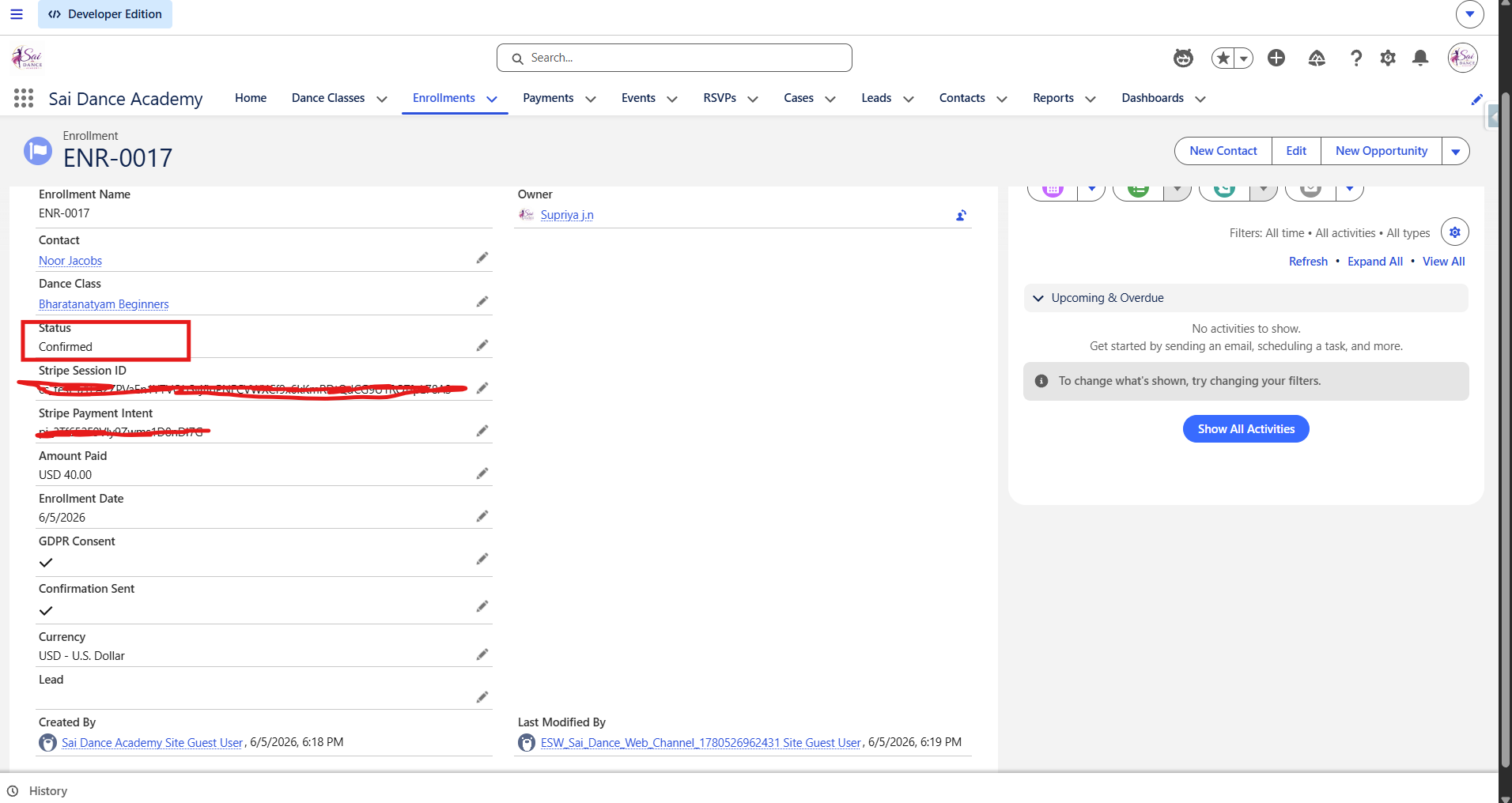
Enrollment confirmed — webhook fired, payment recorded
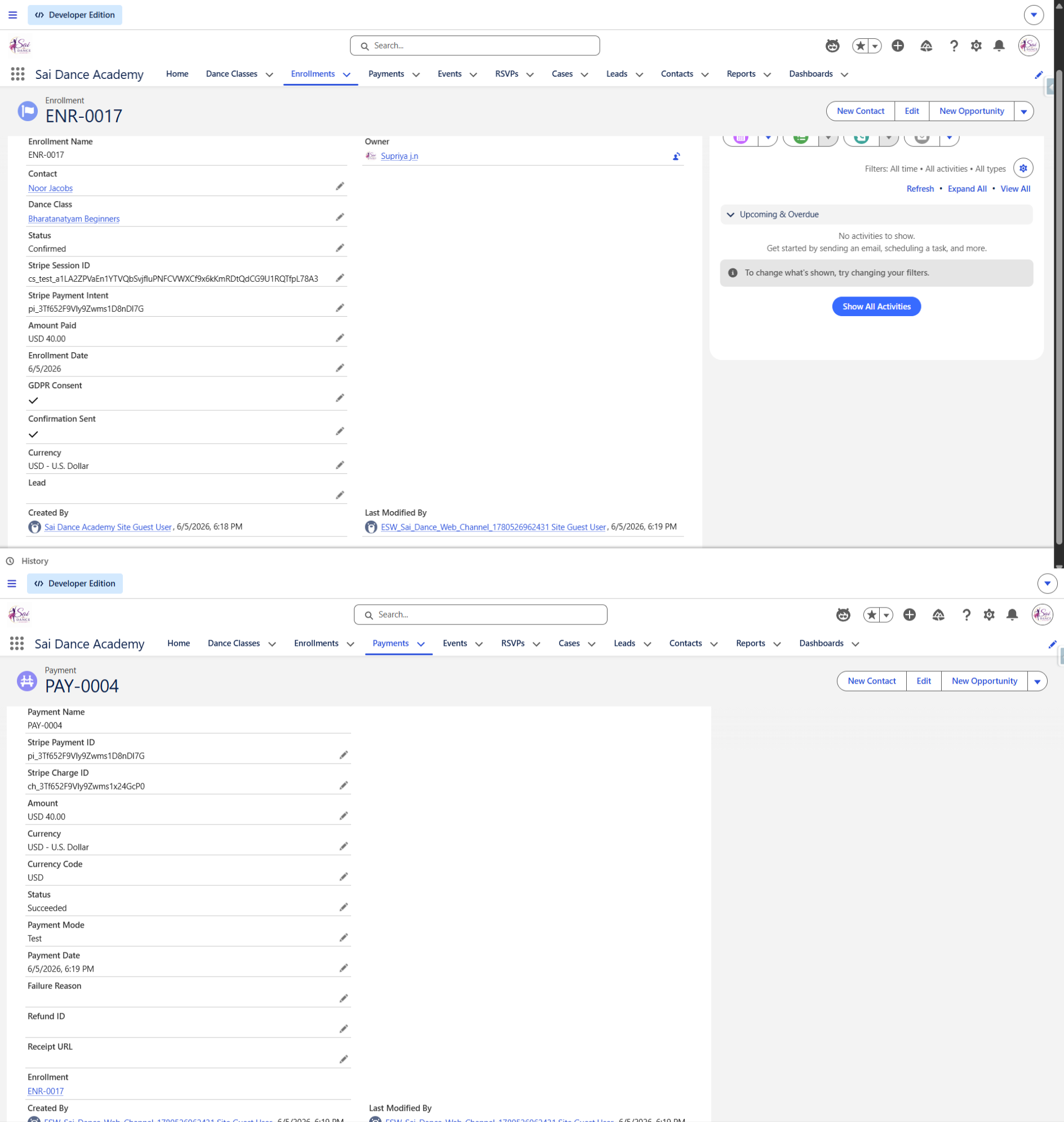
Payment audit record — amount, status, Stripe ID
Scoping is a skill. These features were deliberately left out of the MVP — not because they're hard, but because the MVP needed to be complete and demonstrable first. The path to each is documented.
1
Admin Assistant agent (Agentforce)
An internal-facing agent for operational insight — "what needs attention today?" covering stuck payments, SLA breaches, capacity, and revenue. Later: safe write actions with confirmation and guardrails.
2
Spot reservation during checkout
Hold a class spot for "Awaiting Payment" enrollments during checkout with a scheduled release of abandoned reservations — prevents both overselling and ghost-holds.
3
Unified payment audit for events
Add an optional RSVP relationship to Payment so event payments also produce audit records — currently only class enrollments generate Payment__c records.
4
Webhook hardening for production
Stripe signature verification and idempotency handling. MVP webhook trusts all inbound calls — production requires verification of the Stripe-Signature header.
5
Pre-filled enrollment from catalogue
Carry the selected class from the catalogue into the enrollment form via a parameterized link — removes the need to re-select a class the visitor already chose.
On Using AI as a Coding Partner
The Apex and LWC in this project were written with AI as a coding partner — the same way I'd pair with a senior developer on a real engagement. The architecture, the data model, the integration design, the debugging, and every decision about how pieces connect — that work was mine.
This project replicates patterns from real professional experience with Experience Cloud, payment integrations, and external systems. I built it to make that experience visible, since the original client work lives behind NDAs. The debugging record in this article is the best evidence of hands-on problem-solving — those fourteen issues required platform knowledge to diagnose, not just code to fix.
Try the live platform
The full platform is live. Use Stripe test card 4242 4242 4242 4242, any future date, any CVC. Use a real email to receive confirmation emails. Gmail users: check spam — dev org emails may be filtered. Outlook or Yahoo is more reliable for testing.
Experience Cloud (LWR) · Lightning Web Components · Apex · Flows · Agentforce · Service Cloud · Stripe · 5 Custom Objects